
Students always need someone’s help with their studies so that they can properly understand the concepts they find difficult. Parents and teachers have traditionally helped students with this. Later, students also began taking separate tuition classes, in addition to attending school, to understand more subjects and concepts.
However, in the present era, technology has advanced so much that even difficult topics can be understood easily and in detail. With artificial intelligence available today, students can understand difficult concepts that they are unable to grasp while studying at home. Numerous AI tools are available for this purpose, and one of the most important among them is ChatGPT.
ChatGPT has now become a study partner for students. With the help of ChatGPT, students can understand difficult concepts, organize their notes, create quizzes, and receive feedback on whatever they are studying. This feedback can help students identify the topics they need to practice more.
However, we must be careful not to become completely dependent on ChatGPT. Instead, we should use it as a tool to help us understand and explain things. Complete dependence on it can, in some ways, reduce a student’s ability to think and understand independently. Along with using ChatGPT, we should also refer to what teachers have taught us and read the relevant textbooks available in the market.
Through this guide, you will learn how to use ChatGPT for your studies, what kinds of prompts you should provide to obtain the information you need, and how to use ChatGPT for exam preparation, homework, assignments, and skill development. All these aspects will also be covered in this guidebook.
“How does ChatGPT help students?”
In this section, we will learn how ChatGPT can help students with their studies.
Students can use ChatGPT to:
- Explain difficult concepts in simple language.
- Summarise chapters, lessons, and lecture notes.
- Create personalized study plans.
- Organize rough notes into revision guides.
- Generate flashcards and memory aids.
- Create quizzes and multiple-choice questions.
- Explain incorrect answers.
- Compare related concepts.
- Provide real-world examples.
- Improve grammar and clarity.
- Review the structure of an assignment.
- Prepare presentation outlines.
- Create topic maps.
- Practice a new language.
- Prepare for examinations.
- Simulate mock interviews and oral exams.
- Break large projects into smaller tasks.
- Create daily revision schedules.
- Identify weak areas.
- Turn rubrics into practical checklists.
How does a simple ChatGPT study workflow work?
The workflow below shows how a student can get the maximum possible benefit from ChatGPT for their studies. By following this workflow, students can improve their understanding of their studies and concepts, which will also help them achieve greater success in examinations.
A productive study session should follow a learning cycle:
- Set the context.
- Add your study material.
- Understand the topic.
- Practice active recall.
- Learn from mistakes.
- Review your weak areas.
1. Set the Context
Tell ChatGPT your subject, level, topic, goal, deadline, and available study time. The more specific your instructions are, the more relevant the response is likely to be.
Prompt:
Act as a [grade/course level] [subject] tutor. I am studying [topic], and my goal is to [goal] by [date]. I have [amount of time] available. Help me study efficiently and ask questions if you need more context.
2. Add Your Study Material
Paste your own notes, textbook extracts, lecture slides, practice questions, assignment instructions, or marking rubric where permitted. This helps ChatGPT focus on the material your class is actually covering.
Prompt:
I am studying [subject] at [grade/course level]. My topic is [topic]. Here are my notes: [paste notes]. Organize them into key concepts, definitions, examples, and likely exam questions.
3. Understand Before Memorising
Before memorising a definition or formula, make sure you understand the underlying idea. Ask for a plain-language explanation, an everyday example, or a comparison with a related concept.
Prompt:
Explain [topic] at a [grade/course level]. Start with a simple explanation, give one everyday example, and finish with one question to check my understanding.
4. Practice Active Recall
Active recall involves trying to remember information without looking at your notes. Ask ChatGPT to quiz you one question at a time, but attempt each answer before viewing the explanation.
Prompt:
Create 10 active-recall questions on [topic] using these notes: [paste notes]. Include easy, medium, and difficult questions. Ask one question at a time and wait for my answer before giving feedback.
5. Learn From Mistakes
A wrong answer shows you what to revise. Ask ChatGPT to identify what you understood, locate the first mistake, and give you a similar problem to try independently.
Prompt:
Here is my answer: [paste answer]. Identify what I understood correctly, point out the first mistake or missing idea, explain it clearly, and give me one similar question to try.
6. Review and Repeat
At the end of a study session, ask ChatGPT to identify your weakest areas and create a short follow-up activity.
Prompt:
Based on my answers in this study session, identify my three weakest areas. Create a 20-minute revision activity for each area, including recall questions and a short self-check.
A Useful ChatGPT Prompt Formula
A strong study prompt usually includes:
Role + level + topic + task + format + limit
For example:
Act as a Grade 11 biology tutor. I am revising photosynthesis for an exam on Friday. Explain the light-dependent reactions in 150 words, then ask me three short-answer questions. Do not give me the answers until I attempt them.
20 Best Ways to Use ChatGPT for Students to Study Smarter
In this section of the manual, we will learn how a student can use the twenty methods given below to improve their studies.
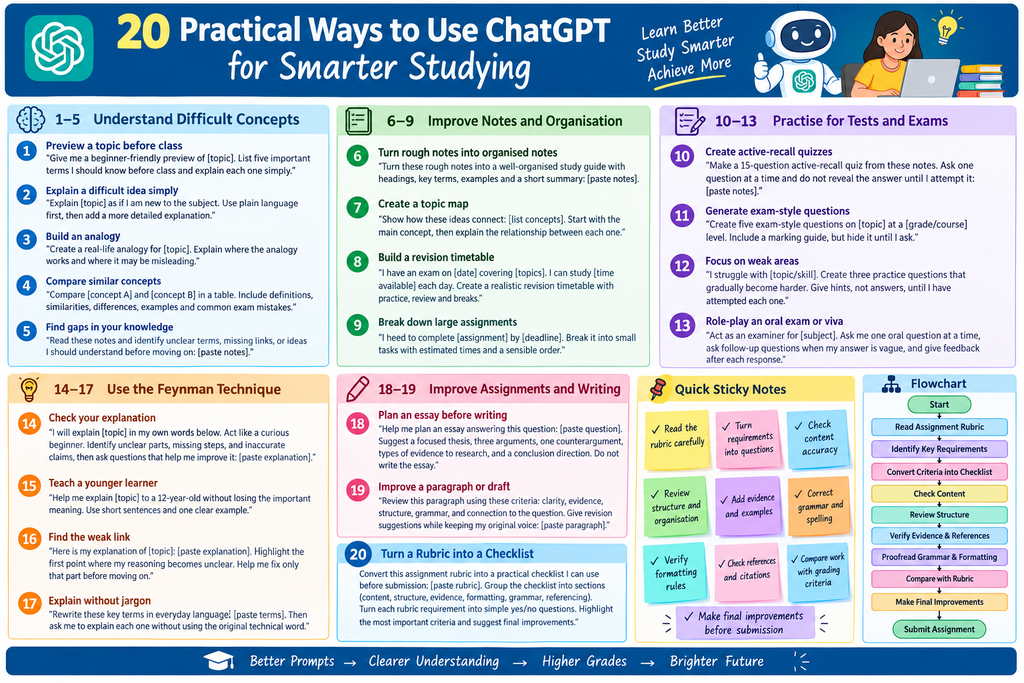
Understand Difficult Concepts
1. Preview a Topic Before Class
Get a short overview of an upcoming chapter so important vocabulary and ideas are familiar before the lesson.
Prompt:
Give me a beginner-friendly preview of it. List five important terms I should know before class and explain each one simply.
2. Explain a Difficult Idea Simply
Ask ChatGPT to break a complex idea into smaller parts. You can request a beginner explanation first, followed by a more detailed version.
Prompt:
Explain [topic] as if I am new to the subject. Use plain language first, then provide a more detailed explanation with an example.
3. Create an Analogy
Analogies can make abstract ideas easier to remember. Always ask where the analogy stops being accurate.
Prompt:
Create a real-life analogy for it. Explain how the analogy works and where it may be misleading.
4. Compare Similar Concepts
Comparison tables are useful when two concepts are easy to confuse.
Prompt:
Compare [concept A] and [concept B] in a table. Include definitions, similarities, differences, examples, and common exam mistakes.
5. Find Gaps in Your Knowledge
Use ChatGPT to identify unclear terms, missing connections, and prerequisite knowledge in your notes.
Prompt:
Read these notes and identify unclear terms, missing links, or ideas I should understand before moving on: [paste notes].
Improve Notes and Organization
6. Turn Rough Notes Into Organized Notes
ChatGPT can help transform incomplete or disorganized notes into a clearer study guide.
Prompt:
Turn these rough notes into a well-organized study guide with headings, key terms, examples, and a short summary: [paste notes].
7. Create a Topic Map
Ask ChatGPT to show how concepts connect instead of studying every fact separately.
Prompt:
Show how these ideas connect: [list concepts] start with the main concept, then explain the relationship between each smaller concept.
8. Build a Revision Timetable
A realistic revision plan should include learning, practice, review, and breaks.
Prompt:
I have an exam on [date] covering [topics]. I can study [amount of time] each day. Create a realistic revision timetable with practice, review, and breaks.
9. Break Down a Large Assignment
Large assignments become easier when divided into smaller tasks with clear deadlines.
Prompt:
I need to complete [assignment/project] by [deadline]. Break it into small tasks with estimated times and place them in a sensible order.
Practice for Tests and Exams
10. Create an Active-Recall Quiz
Use questions to test memory instead of repeatedly rereading notes.
Prompt:
Make a 15-question active-recall quiz from these notes. Ask one question at a time and do not reveal the answer until I attempt it: [paste notes].
11. Generate Exam-Style Questions
Practise the same types of questions you may encounter in an assessment.
Prompt:
Create five exam-style questions [topic] at a [grade/course] level. Include a marking guide, but hide it until I ask.
12. Focus on Weak Areas
Target difficult skills instead of spending equal time on everything.
Prompt:
I struggle with [topic/skill]. Create three practice questions that gradually become harder. Give hints, not answers, until I have attempted each one.
13. Simulate an oral exam or viva.
An oral examination can help you practise explaining ideas clearly and responding to follow-up questions.
Prompt:
Act as an examiner for [subject]. Ask me one oral question at a time, ask follow-up questions when my answer is vague, and give feedback after each response.
Use the Feynman Technique.
The Feynman technique involves explaining an idea in simple language, as if you were teaching it to someone with no background knowledge. If your explanation becomes vague or overly technical, you may have found a gap in your understanding.
14. Check Your Explanation
Prompt:
I will explain [topic] in my own words below. Act like a curious beginner. Identify unclear parts, missing steps, and inaccurate claims, then ask questions that help me improve it: [paste explanation].
15. Teach a Younger Learner
Prompt:
Help me explain [topic] to a 12-year-old without losing the important meaning. Use short sentences and one clear example.
16. Find the Weak Link
Prompt:
Here is my explanation of [paste explanation]. Highlight the first point where my reasoning becomes unclear. Help me fix only that part before moving on.
17. Explain Without Jargon
Prompt:
Rewrite these key terms in everyday language: [paste terms]. Then ask me to explain each one without using the original technical word.
Improve Assignments and Writing
18. Plan an Essay Before Writing
Use ChatGPT to develop an argument and organise your ideas without asking it to write the final essay.
Prompt:
Help me plan an essay answering this question: [paste question]. Suggest a focused thesis, three arguments, one counterargument, types of evidence to research, and a possible conclusion. Do not write the essay.
19. Improve a Paragraph or Draft
Ask for feedback on clarity, evidence, structure, grammar, and relevance while preserving your own voice.
Prompt:
Review this paragraph using these criteria: clarity, evidence, structure, grammar, and connection to the question. Give revision suggestions while keeping my original voice: [paste paragraph].
20. Turn a Rubric Into a Checklist
A rubric becomes more useful when converted into practical actions before submission.
Prompt:
In this section of the guide, we will learn about the prompts that you can write to get exactly what you want. This is because, when using any AI tool, it is very important to know what you want to know and what you need to write to ChatGPT to explain what you want to learn or do. If you do not write the prompt properly, you will not get an answer according to your expectations. Remember that an AI tool is a machine, and it provides answers based on the information available to it. Unlike humans, it does not have the same level of thinking and understanding ability. Therefore, we should be very careful when choosing our words while writing prompts. Below are the prompt codes that you can add to your questions when asking ChatGPT, and you will get answers that closely match your expectations without needing to write long and complicated prompts.
Turn this assignment rubric into a student-friendly checklist. For every criterion, explain what strong work would look like: [paste rubric].
ChatGPT Prompt Codes for Students
Short prompt codes can make study requests easier to reuse. Add the code before your subject and task.
| Prompt Code | What it does | Example |
|---|---|---|
| /tutor | Teaches step by step | /tutor Explain photosynthesis for Grade 10. Ask one question at a time. |
| /simple | Uses plain language | /simple Explain Newton’s laws with everyday examples. |
| /notes | Organises notes | /notes Turn these rough notes into headings, definitions, and examples. |
| /summary | Creates a short recap | /summary Summarise this chapter in 10 bullet points. |
| /flashcards | Creates recall cards | /flashcards Create 20 Q&A cards from these notes. |
| /quiz | Tests knowledge | /quiz Create a quiz on cell division. Hide answers until I respond. |
| /practice | Creates graded practice | /practice Give me three algebra questions from easy to hard. |
| /hint | Gives guidance without solving | /hint Help me solve this problem step by step. Do not reveal the final answer. |
| /feynman | Checks an explanation | /feynman Identify the first unclear idea in my explanation of gravity. |
| /compare | Distinguishes concepts | /compare Compare mitosis and meiosis in a table. |
| /examples | Provides applications | /examples Give three real-world examples of supply and demand. |
| /mnemonic | Creates memory aids | /mnemonic Make a mnemonic for the stages of mitosis. |
| /studyplan | Creates a revision schedule | /studyplan Plan revision for my exam on [date]. |
| /breakdown | Divides a task into steps | /breakdown Break this assignment into tasks with estimated times. |
| /outline | Plans an essay or answer | /outline Create an essay outline with a thesis and counterargument. |
| /rubric | Creates a checklist | /rubric Convert this marking rubric into a checklist. |
| /feedback | Reviews student writing | /feedback Review my paragraph for clarity, evidence, structure, and grammar. |
| /examiner | Simulates an oral exam | /examiner Ask me oral questions on [topic]. |
| /factcheck | Identifies claims to verify | /factcheck List the claims in this text that need verification. |
| /review | Creates a follow-up session | /review Create a 30-minute study session based on my weak areas. |
The Sticky Note Prompt Formula
A simple reusable format is:
/prompt code + subject/level + specific task + study material + output rule
Example:
/tutor /quiz I am a Grade 11 biology student revising respiration. Use these notes: [paste notes]. Ask five short-answer questions one at a time. Do not show the answers until I attempt each question.
Quick Science Study Workflow
For science subjects, you can combine several prompt codes into one study sequence:
- Use /simple or /tutor to understand the topic.
- Use /notes to organise information.
- Use /feynman to explain the concept in your own words.
- Use /quiz or /practice to test your memory.
- Use /hint when you are stuck.
- Use /flashcards or /mnemonic to revise weak areas.
- Use /factcheck and your textbook to verify facts, formulas, and calculations.
When solving scientific problems, show your own working, check units and calculations, and follow laboratory safety instructions.
Use ChatGPT Responsibly
ChatGPT should support learning, not replace it. Use it to understand, practise, plan, and improve—not to submit AI-generated work as your own.
Before using ChatGPT for schoolwork:
Before using ChatGPT for schoolwork, you should also keep the following precautions in mind to avoid any kind of problem.
- Check your school or institution’s AI policy.
- Do not upload private, confidential, or sensitive information.
- Verify important facts, calculations, quotations, sources, and citations.
- Keep your own notes and explanations.
- Attempt questions yourself before asking for solutions.
- Ask for hints and feedback instead of copying complete answers.
- Review and edit anything ChatGPT produces.
- Make sure your final work reflects your own understanding.
AI-assisted content should provide genuine value to readers and should not be produced at scale merely to manipulate search rankings. Google’s guidance also recommends reviewing AI-assisted content for accuracy, usefulness, metadata quality, and originality.
How does Chatgpt work?
ChatGPT can serve as an assistant in your studies, helping you with various study-related tasks, such as exam preparation, revision, note organization, and writing feedback. However, always keep in mind that it is a machine and cannot replace a teacher.
🔔 Subscribe to GrowwTechEducation for the latest articles on AI Tools, Technology, Education, Career Opportunities, Study Tips, Skills, and Online Learning.
❤️ Like & Support us — Your support motivates us to create more useful and informative content.
📲 Follow GrowwTechEducation and stay updated with new guides, tutorials, AI tools, career information, and helpful resources.
Thank you for being a part of the GrowwTechEducation community!
Suggested FAQ Section
Is ChatGPT useful for students?
Can ChatGPT create a study plan?
Can ChatGPT help with homework?
How can students use ChatGPT for exam preparation?
Should students trust every ChatGPT answer?
: “ChatGPT for Students: 20 Practical Ways to Study Smarter”
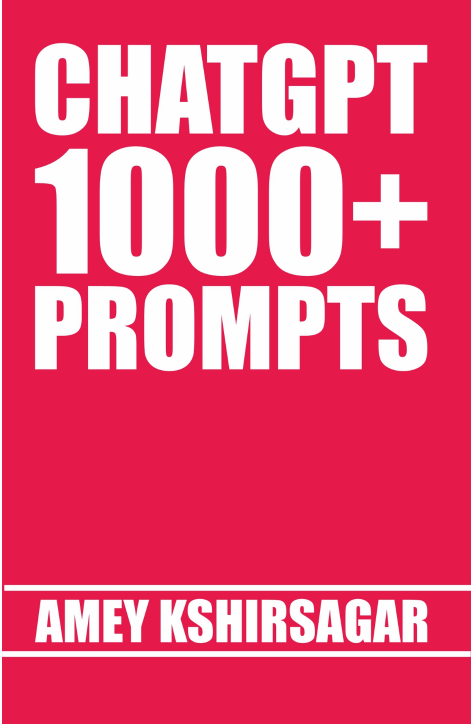
For More Information Regarding This Book Kindly Click on Link Below
Related Guides You’ll Love
-
Best AI Tools for Students and Professionals in 2026
Complete list of the most useful AI tools for students and working professionals. -
10 Best AI Tools for Students with Free Plans in 2026
Best free AI tools that work without paying or credit card.