Best AI Tools for Students and Professionals in 2026
People have always needed the advice or help of others to get their work done. This practice has existed since ancient times. Whether someone wants to know how to draft a letter, how to fill out a form, how a particular technology works, or how a car engine functions, they have traditionally had to ask other people or seek their advice. This is because no single person can know everything.
However, even in such situations, we need to be careful about whom we ask. Does that person actually have knowledge of the subject? Could they provide incorrect advice? These are important considerations whenever we depend on someone else for information or guidance.
Modern technology has made this process easier to some extent. Today, instead of always depending on another person for advice, guidance, or information, we can use machines and digital tools. One of the technologies that makes this possible is Artificial Intelligence (AI).
The basic purpose is still similar, but the method has changed. Earlier, people had to search for the right person and seek their help. Now, with the help of AI tools, a person can access information from almost anywhere in the world and use it to make their work easier and more efficient.
AI is useful for students, office professionals, engineers, researchers, and people working in many other fields. Students can use AI to understand difficult lessons, summarise their study materials, practise for exams, and improve their writing skills.
The business and professional use of AI is also growing rapidly. Industries and organisations are increasingly using AI for preparing project reports, writing and summarising reports, creating presentations, analysing data, automating repetitive tasks, and improving productivity.
However, just as we previously had to select the right person for a particular task, today we face another important question: Which AI tool should we use for a particular task?
Thousands of AI applications and tools are now available. Almost every platform claims to improve productivity, but choosing the right tool for your specific needs can be difficult. Some tools are useful for research but may not be equally effective for writing. Some tools can provide highly scientific information in a simple and understandable way, while others may sometimes provide information that is inaccurate or requires further verification.
Therefore, AI should certainly be used, but we should also remember to re-verify important information provided or explained by an AI tool. AI can be a powerful assistant, but its output should not automatically be treated as completely accurate, particularly when the information is important or has professional, academic, financial, or other real-world consequences.
In addition, while selecting an AI tool, we need to consider our professional qualifications, specific requirements, and budget. The best tool is not necessarily the one with the most features; it is the one that is appropriate for the task, user, and available resources.
This article explores which AI tools may be useful for students and professionals in 2026 and how they can help improve productivity. It covers AI tools and their applications across areas such as education, research, writing, presentations, design, productivity, coding, mathematics, language learning, meetings, and career development.
Important: AI should support learning and human judgement, not replace them. Always verify important information, follow your institution’s AI policy, and do not submit AI-generated work as your own when this is prohibited.
Best AI Tools at a Glance
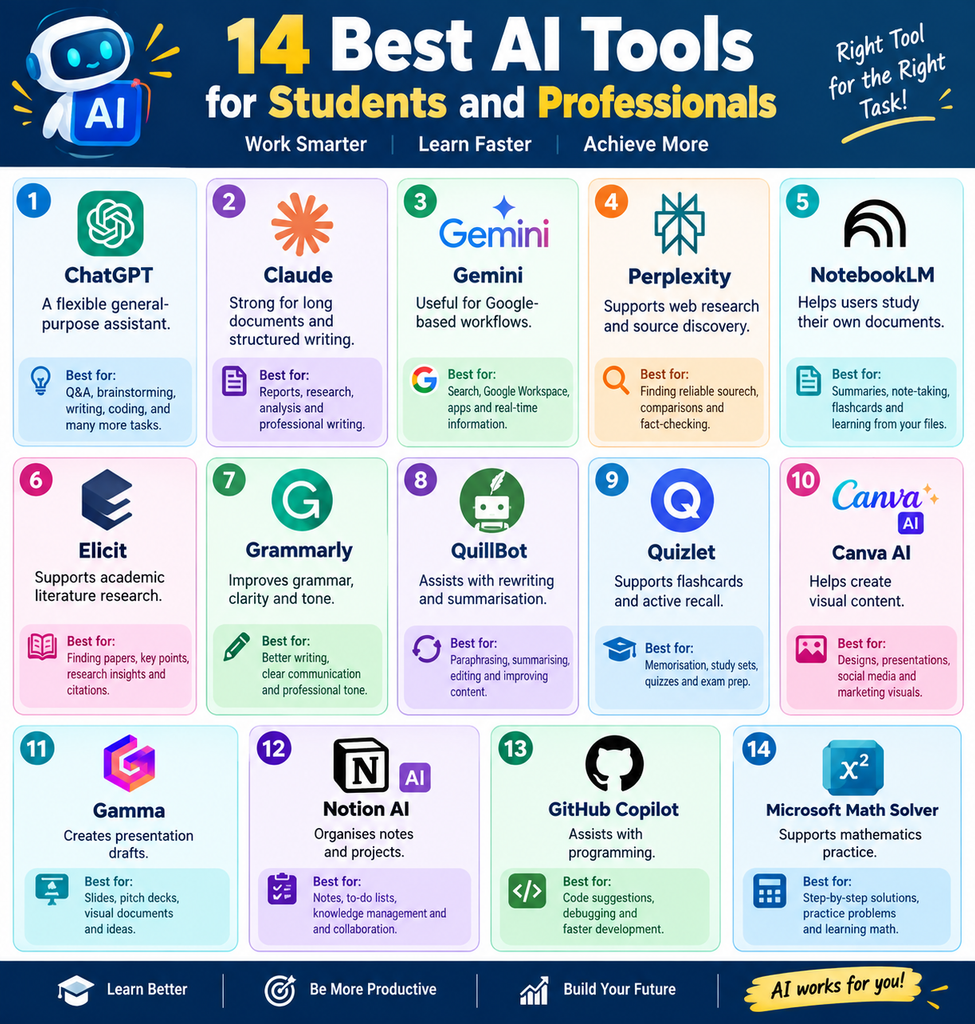
The table below lists AI tools that may help students and professionals improve their productivity. It also explains each tool’s primary purpose, the tasks it can be used for, and the types of users who may benefit from it.
| AI Tool | Best for | Ideal users | Free option |
|---|---|---|---|
| ChatGPT | Tutoring, writing, brainstorming, coding | Students and professionals | Yes |
| Claude | Long-form writing and document analysis | Writers, researchers, consultants | Yes, with limits |
| Google Gemini | Google Workspace and multimodal tasks | Students and office teams | Yes, with paid plans |
| Perplexity | Web research and source discovery | Researchers, students, analysts | Yes |
| NotebookLM | Studying uploaded documents | Students, teachers, researchers | Availability may vary |
| Elicit | Academic literature research | University students and researchers | Yes, with limits |
| Grammarly | Grammar and professional communication | Students and professionals | Yes |
| QuillBot | Paraphrasing and summarisation | Students and content teams | Yes, with limits |
| Quizlet | Flashcards and exam revision | School and university students | Yes, with paid features |
| Canva AI | Presentations and visual content | Students, teachers, marketers | Yes, with paid features |
| Gamma | AI presentations and documents | Professionals and students | Yes, with limits |
| Notion AI | Notes and project management | Teams and individuals | Paid features may apply |
| GitHub Copilot | Coding and programming assistance | Developers and computer science students | Plan-dependent |
| Microsoft Math Solver | Mathematics support | School and university students | Yes |
Prices, features, usage limits, and student offers can change. Always check the official product page before purchasing. For example, Google currently lists multiple Google AI plans, while ChatGPT offers free, individual, business, and education options.
Why Use AI Tools in 2026?
When computers started coming into use among the general public, they were used only for limited tasks because their memory was fixed at that time and they did not have the ability to think. However, it was already being discussed that in the future, a generation of thinking computers, or “thinkable computers”, would emerge.
Today, the technology we have in front of us, which we call AI, can now think and also provide answers after processing information. Therefore, its use is no longer limited to a specific area. Now, you can discuss almost anything with it, and to a great extent, it is also capable of answering your questions.
Modern AI tools can understand documents, images, audio, code, spreadsheets, presentations, etc., and can perform tasks according to your requirements. That is why tasks can be completed more quickly by using AI.
For example, if you are unable to fit a particular part of a machine or do not understand where it should be fitted, you can send its photograph through an AI tool and ask where and how this part should be fitted in the machine. You will get an answer almost immediately because AI tools are connected with information related to such resources from around the world. They can quickly tell you where and how the part should be fitted.
For students, AI can:
- Explain complex topics in simple language.
- Create personalised study plans.
- Turn notes into flashcards.
- Generate practice questions.
- Summarise permitted study materials.
- Provide writing and grammar feedback.
- Help identify gaps in understanding.
- Support mathematics and coding practice.
For professionals, AI can:
- Draft emails, reports, proposals, and presentations.
- Summarise long documents.
- Prepare meeting agendas and action items.
- Analyse non-confidential information.
- Organise projects and tasks.
- Create marketing and training materials.
- Assist with coding and debugging.
- Support research and business planning.
The most effective users do not simply ask AI to complete everything. They use it as a tutor, editor, research assistant, brainstorming partner, analyst, and productivity tool.
Best General AI Assistants
This section of the article presents AI tools that can be useful for students and professionals. It explains what types of tasks these tools are designed for and which users are most likely to benefit from them.
1. ChatGPT
ChatGPT is one of the most versatile AI tools for students and professionals. It can explain concepts, create study plans, generate practice questions, review drafts, brainstorm ideas, write code, summarise text, and help users prepare for interviews.
A student studying economics could ask:
Explain inflation first to a 12-year-old, then at an undergraduate level. After that, create five examination questions with model answers.
A professional could use ChatGPT to prepare a meeting agenda, improve an email, outline a business report, create a project plan, or generate questions for a job interview.
ChatGPT is most useful when the prompt includes context. Instead of writing “Help me study biology,” include the examination level, topic, deadline, textbook, and preferred learning style.
Best for:
- Personalised tutoring.
- Brainstorming.
- Writing outlines.
- Coding explanations.
- Interview preparation.
- Study questions.
- Professional communication.
Limitations: ChatGPT can produce incorrect or outdated information. It may also create inaccurate references if asked to generate citations without verification. Check important claims against reliable sources.
ChatGPT offers a free version, while paid plans provide additional features and higher usage limits. OpenAI’s current pricing information lists individual and business options, including ChatGPT Plus and workplace plans.
2. Claude
Claude is especially useful for long-form writing, document analysis, editing, and structured reasoning. Students can use it to review lecture notes, compare arguments, improve an essay outline, or identify gaps in a research plan.
Professionals can use Claude to analyse reports, edit proposals, create internal documentation, and convert technical information into plain language.
Claude works well when the user provides a clear role and objective. For example:
Act as an academic editor. Review this essay outline for logical gaps, unsupported claims, and unclear transitions. Do not rewrite the entire essay.
Best for:
- Long documents.
- Research summaries.
- Report editing.
- Policy writing.
- Structured brainstorming.
- Plain-language explanations.
Limitations: Always review its conclusions, especially when working with complex academic, legal, medical, or business material.
3. Google Gemini
Google Gemini is a practical option for users who already work with Google services. Depending on the account and region, it can assist with documents, emails, research, images, planning, and other multimodal tasks.
Students can use Gemini to brainstorm assignment topics, summarise permitted material, prepare revision questions, and organize academic work. Professionals can use it for email drafts, project documents, presentations, and research.
Google currently lists different AI subscription levels, including Google AI Plus, Google AI Pro, and Google AI Ultra. Features and availability may vary by country and account type.
Best for:
- Google Workspace workflows.
- Multimodal assistance.
- Document and email support.
- Brainstorming.
- General research.
Best AI Tools for Research
4. Perplexity
Perplexity is designed for search-orientated research. It provides direct answers and usually includes links to sources that users can review.
Students can use it to understand a new topic, discover research terminology, locate relevant websites, and create a preliminary reading list. Professionals can use it to research industries, competitors, technology trends, and market developments.
A responsible research workflow includes:
- Ask a broad question to understand the topic.
- Identify important names, terms, and sources.
- Open the linked sources.
- Compare information from authoritative websites.
- Cite the original material in the final work.
Best for:
- Initial research.
- Current information.
- Source discovery.
- Industry research.
- Topic comparisons.
Limitations: A linked source does not guarantee that the AI summarized it correctly. Read important sources directly.
5. NotebookLM
NotebookLM is useful when users want answers based on a specific collection of documents. Students can upload permitted lecture notes, study guides, articles, or research materials and ask questions about those sources.
Possible study prompts include:
- Summarize this chapter in 10 key points.
- Create 15 examination questions from these notes.
- Compare the theories discussed in these documents.
- Identify terms that require further explanation.
- Create a revision guide organized by topic.
Professionals can use NotebookLM to review project documents, internal manuals, research materials, and meeting information.
Best for:
- Source-based study.
- Document summaries.
- Research organization.
- Revision guides.
- Connecting information across documents.
Limitations: The tool cannot correct missing or inaccurate source material. Users must also consider copyright, privacy, and institutional rules before uploading documents.
6. Elicit
Elicit supports academic literature discovery. It can help students and researchers find potentially relevant papers, identify themes, and organize information for literature reviews.
It is useful during the early stages of a dissertation, thesis, research proposal, or academic project. Users can describe a research question and explore related studies rather than relying only on exact keyword searches.
Best for:
- Literature reviews.
- Finding academic papers.
- Comparing studies.
- Identifying research gaps.
- Organizing scholarly evidence.
Limitations: Read the original papers carefully. Check the methodology, sample size, publication details, limitations, and conclusions before citing a study.
Best AI Writing Tools
7. Grammarly
Grammarly helps improve grammar, spelling, punctuation, clarity, conciseness, and tone. It is useful for essays, applications, professional emails, reports, proposals, and online content.
Students should use Grammarly primarily as an editing assistant. Write your own ideas first, then use the tool to identify errors and improve clarity.
Professionals can use it to create clearer customer messages, more professional emails, and consistent business communication.
Best for:
- Grammar correction.
- Proofreading.
- Email improvement.
- Tone adjustment.
- Clearer sentences.
Grammarly offers a free plan and paid options. Its official plan information lists free features and Pro features, with pricing that may differ between annual and monthly billing.
8. QuillBot
QuillBot provides paraphrasing, summarisation, grammar checking, and related writing features. It can help simplify complex sentences or create a shorter version of a passage.
Students must use paraphrasing tools carefully. Replacing words in a source does not automatically create original writing. The source must still be understood and cited properly.
Best for:
- Rewriting awkward sentences.
- Simplifying language.
- Summarizing notes.
- Creating alternative headlines.
- Improving readability.
Avoid: Using paraphrasing software to disguise copied content.
Best AI Tools for Studying
9. Quizlet
Quizlet supports flashcards, vocabulary practice, and exam preparation. AI features can help convert notes into questions or study activities.
The strongest study method is active recall. Instead of repeatedly reading a chapter, students can test themselves with questions and flashcards.
Students should inspect AI-generated flashcards for mistakes. An incorrect card can reinforce incorrect information.
Best for:
- Vocabulary.
- Definitions.
- Exam revision.
- Flashcards.
- Self-testing.
10. AI Language-Learning Tools
AI language-learning tools can provide conversational practice, corrections, explanations, and role-play situations. Students can practice interviews, travel conversations, presentations, and everyday communication.
For example, an English learner can ask an AI tool to simulate a job interview, correct grammar after each answer, and explain more natural alternatives.
Best for:
- Conversation practice.
- Vocabulary development.
- Grammar correction.
- Interview role-play.
- Pronunciation support.
AI practice should supplement, not replace, interaction with teachers, classmates, and native speakers.
11. Microsoft Math Solver
Microsoft Math Solver helps learners work through mathematical problems and understand the steps involved.
The best way to use it is to attempt the problem first. If the answer is incorrect, ask the tool to explain the step where the error occurred.
Best for:
- Algebra.
- Equations.
- Calculus practice.
- Homework checking.
- Understanding solution methods.
Students should focus on the method rather than copying the final answer.
Best AI Tools for Presentations and Design
12. Canva AI
Canva AI helps users create presentations, posters, infographics, worksheets, social media graphics, and educational materials.
Students can use Canva to create project presentations and visual summaries. Professionals can produce marketing graphics, training materials, reports, and social media content.
Best for:
- Presentations.
- Infographics.
- Posters.
- Educational worksheets.
- Social media designs.
Review all AI-generated text and images before publishing. A professional design can still contain inaccurate information.
13. Gamma
Gamma can convert an idea, outline, or document into a presentation or structured visual page. It is useful when the user needs a fast first draft.
A student can enter a project topic and request sections for background, evidence, analysis, and conclusion. A business professional can create a draft proposal, training deck, or sales presentation.
Best for:
- Presentation drafts.
- Project proposals.
- Pitch decks.
- Training materials.
- Visual reports.
The generated presentation should be edited for accuracy, originality, audience, and visual quality.
Best AI Tools for Productivity
14. Notion AI
Notion AI combines notes, databases, task management, and AI assistance. Students can use it to organize assignments, reading lists, revision schedules, and project notes.
Professionals can manage meeting notes, project documentation, task lists, and team knowledge.
A productive workflow might convert meeting notes into:
- Decisions.
- Action items.
- Responsible team members.
- Deadlines.
- Follow-up questions.
Best for:
- Note-taking.
- Project management.
- Knowledge management.
- Assignment planning.
- Meeting organisation.
The quality of the result depends on the quality of the workspace. Well-organised information produces more useful outputs.
15. AI Meeting Assistants
AI meeting assistants can transcribe conversations, summarise discussions, identify decisions, and create action items.
They are useful for remote teams, group projects, interviews, and professional meetings. However, users should obtain the required consent before recording or transcribing a meeting.
Best for:
- Meeting summaries.
- Action-item tracking.
- Interviews.
- Team collaboration.
- Lecture review where permitted.
Do not upload confidential meeting information to an unapproved platform.
Best AI Tools for Coding
16. GitHub Copilot
GitHub Copilot assists developers and programming students with code completion, function generation, debugging, explanations, tests, and documentation.
It can help beginners understand programming patterns and help experienced developers’ complete routine tasks more quickly.
However, generated code must be reviewed and tested. It may include security vulnerabilities, incorrect assumptions, outdated methods, or unsuitable dependencies.
Best for:
- Code completion.
- Debugging.
- Test generation.
- Code explanations.
- Documentation.
- Learning programming patterns.
Students should check whether AI coding assistants are permitted in their assignments or examinations.
| Profession | Useful AI categories | Example uses |
|---|---|---|
| Student | Tutoring, research, flashcards, writing | Revision, summaries, practice questions |
| Teacher | Lesson planning, quizzes, differentiation | Classroom activities and assessment ideas |
| Researcher | Literature discovery, document analysis | Literature reviews and source organization |
| Marketer | Writing, design, analytics | Campaign ideas and social content |
| Developer | Coding assistants and debugging tools | Code generation and testing |
| Designer | Image, presentation, and layout tools | Prototypes and visual concepts |
| Manager | Meeting, project, and writing tools | Plans, reports, and action items |
| Job seeker | Writing and interview tools | Resumes, cover letters, and mock interviews |
| Business owner | Research, automation, and content tools | Market research and customer communication |
This section presents categories of AI software in the table below according to the different needs of individuals, along with how and for what purposes they can be used. With the help of this table, anyone can choose an AI app category according to their needs and then explore the AI tools within that category that are necessary for them.
How to Choose the Right AI Tool?
In this section of the article, we will consider how to choose an AI tool for our work. For this, we will need to keep the following points in mind so that we can remain safe while also making our work easier.
Define the task
Start with a specific goal. Do you need tutoring, research, editing, automation, design, or data analysis? A specialised tool may be better than a general assistant.
Check accuracy
Look for source links, document grounding, transparent limitations, and the ability to review supporting material.
Protect privacy
Do not upload confidential business plans, personal records, customer data, examination papers, private messages, or unreleased research without permission.
Compare costs
Consider free plans, paid features, usage limits, student discounts, team pricing, and annual versus monthly billing.
Review integrations
A tool that connects with your existing documents, calendar, cloud storage, browser, or project software may save more time than a standalone platform.
Check policies
Universities, schools, and employers may have different rules for AI use. Always check the relevant policy before using AI for assessed work or client projects.
How to Use AI Responsibly?
Responsible AI use includes:
- Verify important facts through reliable sources.
- Do not invent or submit unverified citations.
- Disclose AI assistance when required.
- Protect confidential and personal information.
- Keep your own reasoning involved.
- Check generated content for bias.
- Review names, dates, numbers, quotations, and statistics.
- Test generated code before using it.
- Avoid plagiarism, impersonation, and academic cheating.
- Keep a record of how AI was used when transparency matters.
From Learner to Leader: A Practical Playbook for AI Workflows and Monetisation
In this section of the article, we will see how AI tools can enhance the skills of a student or professional and provide them with greater speed in their work. How the work they do through AI tools can be used to earn an income or how it can be turned into a source of income is also explained in this section. If we consider this, we can use AI tools to increase our income rapidly.
Two Simple Workflows That Actually Work
For Students: Attempt → Assist → Verify → Reflect
- Attempt: Solve the problem yourself first. This builds intuition and exposes gaps.
- Assist: Use AI to explain concepts, critique your approach, or suggest alternatives.
- Verify: Cross-check AI outputs with textbooks, lectures, or trusted sources.
- Reflect: Note what you learned, what you’d do differently, and add it to your personal knowledge base.
For Professionals: Brief → Generate → Inspect → Refine
- Brief: Define goal, audience, constraints, and success metrics.
- Generate: Let AI draft content, code, or analysis.
- Inspect: Audit for accuracy, tone, originality, and compliance (especially for affiliate/sponsored content).
- Refine: Apply human expertise to strengthen arguments, add examples, and align with brand voice.
How to Monetise AI & Education Content (Without Burning Trust)
Sites that publish AI tools, tutorials, and study workflows can earn through multiple complementary channels. The key is to lead with usefulness, disclose clearly, and avoid over-optimising for clicks.
1) Affiliate Marketing (High-Intent Reviews & Comparisons)
- Write honest, experience-based reviews and comparison tables.
- Disclose affiliate links prominently (FTC-style “clear and conspicuous” placement before substantive content).
- Prioritise recurring SaaS affiliates (often 20–40% recurring) over low-rate retail links for AI-tool niches.
CTAs that convert: “Compare plans”, “Read the full review”, “Try the free version”.
2) Sponsored Content (Tutorials, Reviews, Resources)
- Partner with tech companies for sponsored tutorials, tool deep-dives, or educational resources.
- Label sponsored material clearly to maintain credibility and comply with disclosure norms.
- Build a simple media kit (audience, traffic, demographics) to attract sponsors as you grow.
3) Digital Products (Working Artifacts, Not Just Info)
- Sell prompt packs, study planners, research checklists, Notion templates, and beginner AI courses.
- In 2026, “working artifacts” (workflow bundles, audit scorecards, schema packs) outperform generic ebooks.
- Use platforms like Gumroad, Payhip, or your own site for frictionless delivery.
CTAs that convert: “Download the student prompt pack”, “Get the productivity template”.
4) Email Marketing (Own Your Audience)
- Offer a free AI study guide, prompt pack, or checklist in exchange for newsletter sign-ups.
- Use the list to launch products, share affiliate picks, and promote workshops.
- Keep emails practical: short tutorials, tool updates, and curated resources.
CTAs that convert: “Join the AI productivity newsletter”, “Get the free prompt pack”.
5) Display Advertising (Evergreen Traffic, Light Touch)
- Publish evergreen articles on AI tools and workflows to attract search traffic.
- Avoid ad clutter; too many ads degrade UX and can hurt rankings/AdSense safety for AI content.
- Turn ads on after you have at least one digital product and a couple of recurring affiliates.
6) Courses & Consulting (AI Literacy, Prompting, Automation)
- Offer training in AI literacy, prompt engineering, responsible AI use, research workflows, or workplace automation.
- Workshops and speaking gigs can command strong fees once you document outcomes transparently.
- Stack revenue: content → community → consulting → productised audits.
CTAs that convert: “Book a 1:1 strategy call”, “Join the next AI literacy workshop”.
Trust-Building Rules That Protect Long-Term Revenue
- Disclose early and clearly: For affiliate, sponsored, or AI-substantially-generated content, place disclosures before the main content.
- Avoid unsupported claims: Don’t say “This tool guarantees better grades” or “This app will replace your job.” Evidence-based claims build durable trust.
- Lead with usefulness: Recommend tools for their fit and outcomes, not just commission rates.
Quick Monetisation Sequence (Small Site, 90 Days)
A practical order that balances effort and cash flow:
- Ship one digital product (prompt pack or template).
- Add one productised audit or checklist.
- Layer two recurring SaaS affiliates.
- Then enable display ads
SEO Tips for This Article
How should we prepare our article so that it is viewed by as many people as possible on search engines? To do this, we need to complete the following tasks for every article, because the more viewers, subscriptions, and likes we get, the greater the chance of website monetisation. Now, we will discuss the methods that we need to use to appear more prominently on search engines
- The page title.
- The first paragraph.
- One or two subheadings.
- The meta description.
- The URL slug.
- The conclusion.
- Relevant image alt text.
Add internal links to related articles such as:
- Best free AI tools for students.
- How to use AI without plagiarism?
- Best AI tools for teachers.
- ChatGPT versus Claude versus Gemini.
- Best AI tools for academic research.
- Best AI presentation makers.
- AI prompts for exam preparation.
Update the article regularly because AI features, prices, student offers, and usage limits change frequently. Add original testing, screenshots, expert comments, and practical examples to make the article more useful than generic AI-generated content.
Review
In this article, we considered numerous AI tools and looked at who they are useful for and what tasks can be performed with them. Finally, each AI tool has been mentioned again here along with what it will mainly be used for, making it easier for the person performing the task to choose the right tool.
The best AI tools for students and professionals in 2026 depend on the task.
No AI tool can replace subject knowledge, critical thinking, creativity, or professional judgment. The strongest users combine AI’s speed with human verification and responsibility. Used correctly, these tools can help students learn more actively and help professionals save time on repetitive work while maintaining accuracy, integrity, and originality.
🔔 Subscribe to GrowwTechEducation for the latest articles on AI Tools, Technology, Education, Career Opportunities, Study Tips, Skills, and Online Learning.
❤️ Like & Support us — Your support motivates us to create more useful and informative content.
📲 Follow GrowwTechEducation and stay updated with new guides, tutorials, AI tools, career information, and helpful resources.
Thank you for being a part of the GrowwTechEducation community!