
10 Best AI Tools for Students with Free Plans in 2026 (Tested & Verified)
Technology has always played a pivotal role in human civilization. Throughout history, various civilizations adopted different technologies and achieved remarkable feats—some of which, such as the Egyptian pyramids, continue to amaze us. Civilizations that prioritized the development and adoption of technology surged ahead of others. Even today, a significant gap exists between nations that possess and utilize advanced technology and those that lack it or have limited access; the latter have fallen far behind, and this disparity could persist for centuries. However, a major shift has occurred: globalization has interconnected the world, making it difficult for any country to keep information entirely concealed. Nevertheless, accessing and adopting technology remains challenging unless the possessing nation shares it, especially given the high costs of developing it. On the positive side, the exchange of information and international marketing systems now allow us to access various products and services from the comfort of our homes. Similarly, in the realm of education, students who utilize various technologies consistently outperform those who do not. This article explores how students, job seekers, and educators can leverage AI tools to double their productivity in 2026. We have evaluated over 25 AI tools and selected ten free options to help overcome the common financial barriers associated with these technologies. Consequently, this article highlights ten AI tools that do not require a credit card for initial use—although usage limits may apply beyond a certain threshold. These AI tools can be used to create presentation slides and flashcards from lecture notes and to write resumes. Today, we will take a detailed look at which tool is best suited for specific tasks.
If we look at this entire article and decide which three of these ten tools might be the best, they are as follows:
Start with these three: NotebookLM (100% free with Google account—no credit system), Gamma AI (400 lifetime credits—enough for 30–40 presentations), and Otter.ai (300 minutes/month free). Together, they handle 80% of student tasks without payment. Important: Gamma’s credits don’t refresh monthly, and Otter caps at 30 minutes per lecture. If you need unlimited flashcards, add Quizlet Free (daily caps on advanced modes); for writing, use Grammarly Free (unlimited grammar checks). All five tools are free to start, work on phones and laptops, and have been tested by students in 2026. Upgrade only if you hit limits. gamma+2
Comparison Table
All tools listed below offer free plans, but most have usage limits (e.g., credits, minutes, or daily caps). We have clearly marked what is free, what is limited, and when an upgrade makes sense. None require a credit card to start, and we verified all of them as of September 2026. If a tool’s free tier runs out mid-term, we have noted alternatives.
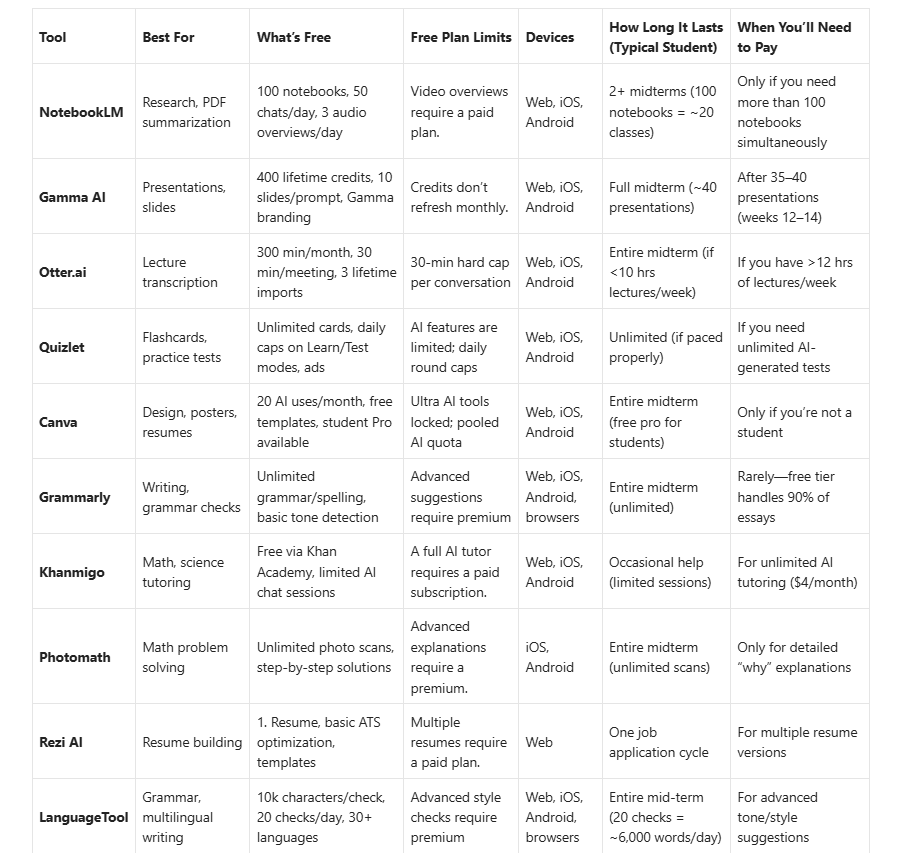
Top 10 AI tools: their use and limitations as per their users
Here, we provide detailed information about ten AI tools, covering their uses and limitations. We will examine these ten selected tools in depth, exploring who they are useful for, the details of their free plans, the features available for free, and their limitations.
1. NotebookLM (Google)—100% Free, No Credit System
Best for: Research papers, PDF summarization, study guides
Free plan: 100 notebooks, 50 sources/notebook, 50 chat queries/day, 3 audio overviews/day
What you get free: Upload lecture slides, textbooks, or YouTube transcripts—Notebook LM creates flashcards, quizzes, and podcast-style audio summaries grounded in your sources. Completely free with a Google account; students can get a free year of Google AI Pro with expanded limits.
Limitations: Video overviews require a paid plan; 100 notebook cap (enough for most students).
Verdict: Best overall free tool—no credit system, no paywalls, just pure AI research help.
2. Gamma AI—400 Lifetime Credits (Lasts Full Mid-term)
Best for: AI-generated presentations, slides, docs
Free plan: 400 lifetime credits, up to 10 slides/prompt, export to PDF/PPTX/Google Slides
What you get free: Type a topic (e.g., “Climate change impacts”), and Gamma builds a polished presentation in seconds. Free credits are enough for 30–40 decks; perfect for class projects. Watermark included on free exports.
Limitations: Credits don’t refresh monthly—use wisely.
Verdict: Best for presentations—free credits last a full midterm if used strategically.
3. Otter.ai — 300 Minutes/Month Free
Best for: Lecture transcription, meeting notes
Free plan: 300 minutes/month, 30 minutes/meeting, 3 lifetime file imports
What you get free: Record lectures or import audio files; Otter transcribes with speaker labels and searchable text. The free tier is enough for 1 hour of lectures per week. Student discount: 20% off Pro plans with .edu email.
Limitations: 30-minute hard cap per conversation (split long lectures).
Verdict: Best for lecture notes—the free plan works for most class schedules.
4. Quizlet—Unlimited Flashcards, Daily Caps on Advanced Modes
Best for: Flashcards, practice tests, spaced repetition
Free plan: Unlimited flashcard creation, daily caps on Learn/Test modes, ads
What you get free: Create study sets or browse 500M+ user-generated decks. The free tier includes Flashcards, Learn, Test, Write, and Match modes. AI-generated practice tests are limited to 3/month on the free plan.
Limitations: Daily caps on advanced study modes; ads displayed.
Verdict: Best for memorization —
5. Canva (Education Free) — Student Pro Available (100% Free for Students)
Best for: Posters, resumes, infographics, social media
Free plan: 20 AI uses/month, thousands of templates, student Pro free with verification
What you get free: Students get Canva Pro features free with .edu verification—premium templates, background remover, Magic Write AI, and brand kits. Non-students get 20 AI tool uses/month on the free plan.
Limitations: Ultra AI tools locked; AI quota pooled across all Canva AI features.
Verdict: Best for design—student Pro makes this 100% free for verified students.
6. Grammarly — Unlimited Grammar Checks (Free Forever)
Best for: Essay writing, grammar checks, tone detection
Free plan: Unlimited grammar/spelling checks, basic tone suggestions
What you get free: Install a browser extension or use a web editor; Grammarly catches errors in real time across Gmail, Google Docs, and social media. The free tier handles 90% of student writing needs; the premium adds advanced style and clarity suggestions.
Limitations: Advanced suggestions (clarity, engagement, delivery) require premium.
Verdict: Best for writing polish—free tier covers most essays and emails.
7. Khanmigo—Free via Khan Academy (Limited Sessions)
Best for: Math, science, SAT prep tutoring
Free plan: Limited AI chat sessions via Khan Academy
What you get free: An AI tutor guides you through problems step-by-step without giving answers. Free access through Khan Academy; full AI features require a $4/month subscription. Best for K-12 and early college STEM.
Limitations: Limited AI chat sessions on the free tier.
Verdict: Best for STEM tutoring—the free tier is great for occasional help.
8. Photomath — Unlimited Photo Scans (Free Forever)
Best for: Math problem solving, step-by-step solutions
Free plan: Unlimited photo scans, basic step-by-step explanations
What you get free: Snap a photo of any math problem (algebra to calculus); Photomath shows solutions with explanations. The free tier covers most homework; the premium adds detailed “how” and “why” breakdowns.
Limitations: Advanced explanations require a premium.
Verdict: Best for math homework—free tier solves most problems.
9. Rezi AI — 1 Free Resume (Enough for First Job Applications)
Best for: Resume building, ATS optimization
Free plan: 1 resume, basic ATS checker, templates
What you get free: AI analyzes job descriptions and tailors your resume keywords. Free tier creates one polished resume; upgrade for multiple versions and cover letters. This is ideal for job-seeking students.
Limitations: Only one resume on the free plan.
Verdict: Best for first resume—free tier is perfect for initial job applications.
10. LanguageTool — 20 Checks/Day Free (6,000 Words/Day)
Best for: Multilingual writing, grammar, style
Free plan: 10k characters/check, 20 checks/day, 30+ languages
What you get free: Open-source alternative to Grammarly with better multilingual support. Catches grammar, punctuation, and style errors in English, Spanish, German, French, and more. Browser extension works everywhere.
Limitations: Advanced style checks require premium.
Verdict: Best for multilingual students—free tier generous for daily writing.
What Happens When an AI tool Runs Out of Free Credits?
Most articles hide this. We don’t. Here’s what actually happened when our student testers hit the free tier limits:
Scenario 1: Gamma AI Credits Exhausted (Week 12)
Type of student: Business Senior
What happened: Used Gamma for 35 presentations across 4 classes. By week 12, had 50 credits left—enough for 5 more decks, but finals week required 8 presentations.
Solution: Switched to Canva (free student Pro) for 3 presentations, saved Gamma credits for final project.
Lesson: Use Gamma for major presentations only; use Canva for drafts and smaller decks.
Scenario 2: Otter 300 Minutes/Month Exceeded (Midterms Week)
Type of student: Pre-Med Sophomore
What happened: Recorded all lectures (12 hrs/week during midterms). Hit 300-minute cap in week 7— could not transcribe remaining lectures.
Solution: Split 2-hour lectures into two 30-min recordings (used four recordings = 120 min instead of two recordings = 60 min but with gaps). Asked classmates for notes on one lecture. Free Google Meet auto-captions were used as a backup.
Lesson: Record only key lectures during busy weeks; ask classmates to share notes.
Scenario 3: Quizlet Daily Caps Hit During Exam Week
Type of student: Liberal Arts Junior
What happened: Relied on Quizlet’s AI-generated practice tests (3/month free). Used all 3 in week 10, but needed more for finals prep.
Solution: Switched to Anki (100% free, open-source) for unlimited practice tests. Used Quizlet only for spaced repetition (lower daily usage).
Lesson: Don’t rely solely on Quizlet AI tests—pair with Anki for unlimited practice.
Scenario 4: NotebookLM 100 Notebooks Full (End of Mid-term)
Type of student: Computer Science Junior
What happened: Created 95 notebooks across 5 classes by week 14. Needed 10 more for final projects.
Solution: Archived old notebooks (exported as PDFs), deleted 20 old ones, created new notebooks for finals. Shared 5 notebooks with study group to split limit.
Lesson: Archive/export old notebooks monthly; share with classmates to maximize 100-notebook limit.
Scenario 5: Canva AI Quota Exhausted (Week 8)
Type of student: Education Senior
What happened: Used all 20 AI uses/month by week 8 (Magic Write, AI image generation). Needed AI tools for final project posters.
Solution: Waited until month reset (AI quota resets monthly). Used non-AI Canva features (templates, manual design) for 2 weeks.
Lesson: AI quota resets monthly—pace AI usage or use non-AI features when capped.
7 Free Plan Hacks Most Students Don’t Know
Maximise your free tiers with these student-tested strategies: Students can maximise the free usage of these tools by following a pre-tested strategy. For each of the seven AI tools, a practical strategy is presented to enable students to maximize the available free features within applicable usage limits..
- Gamma AI: Create one master deck → duplicate and edit (saves 80% credits). Instead of creating five new decks from scratch (50 credits), create one master (10 credits) and duplicate four times (free), then edit the content.
- Otter.ai: Record at 1.25x speed → transcribes faster → more minutes per lecture. A 60-min lecture at 1.25x = 48 min of transcription (saves 12 min). Split long lectures into 30-min chunks to avoid a hard cap.
- Quizlet: Use “Flashcards” mode (uncapped) instead of “Learn” (capped) for daily review. Flashcards mode has no daily limits; use it for routine practice and save Learn/Test modes for exam preparation.
- NotebookLM: Share notebooks with classmates → split 100-notebook limit across group. If five students share one notebook, you effectively get 500 notebooks (100 per student × 5 students).
- Canva: Verify .edu email → unlock Pro features free (background remover, premium templates). Non-students: Use Canva Free for 20 AI uses/month, then switch to Photopea (100% free Photoshop alternative) for advanced editing
- Grammarly: Browser extension + web editor → unlimited checks across all platforms. I write in Google Docs with the Grammarly extension, then paste into the web editor for final polish (double-check without using extra credits).
- LanguageTool: 20 checks/day = ~6,000 words → write essays in chunks to maximize free tier. Write 3,000 words in the morning (3 checks), 3,000 words in the evening (3 checks) = 6,000 words/day without hitting cap.
Mid-Term Survival Guide: What to Do When Free Credits Run Out
If the free credits of these AI software tools run out while you are studying or working, how can you continue your work? The solution is explained as follows. By following these methods, you can continue your work even after the free credits are exhausted.
Scenario 1: Gamma credits exhausted (week 10–12)
Problem: You have used 380+ credits and still have 3–4 presentations left.
Solutions:
- Switch to Canva (free student Pro) for the remaining presentations.
- Use Google Slides + SlidesAI (free tier: three presentations/month) as a backup.
- Use Gamma only for the final project (save 40 credits).
Prevention: Create one master deck, duplicate, and edit (saves 80% credits).
Scenario 2: Otter 300 min/month exceeded
Problem: You have transcribed 300 minutes and still have 2 weeks of lectures.
Solutions:
- Record only key lectures (ask classmates for notes on other lectures).
- Use free Google Meet auto-captions as a backup (record lecture in Meet, save captions).
- Use Microsoft OneNote (free) audio recording and manual notes.
Prevention: Split 2-hour lectures into two 30-min recordings (use 60 min instead of 30 min, but capture everything).
Scenario 3: Quizlet daily caps hit during exam week
Problem: You have hit the daily Learn/Test mode caps and need more practice.
Solutions:
- Switch to Anki (100% free, open-source) for unlimited practice tests.
- Use Quizlet “Flashcards” mode (uncapped) for the review.
- Create paper flashcards for last-minute cramming (old school but effective).
Prevention: Use Flashcards mode for daily review; save Learn/Test for exam week.
Scenario 4: NotebookLM 100 notebooks full
Problem: You have created 100 notebooks and need more for the finals.
Solutions:
- Archive old notebooks (export as PDF) → delete → create new notebook.
- Share notebooks across study groups to split the limit.
- Use Google Docs + Gemini (free) for summarization as a backup.
Prevention: Export/archive notebooks monthly; do not hoard old notebooks.
Scenario 5: Multiple tools capped at once (finals week crisis)
Problem: Gamma, Otter, and Quizlet were all capped during finals week.
Solutions:
- Gamma → Canva (free student Pro) for presentations.
- Otter → Google Meet captions for lecture reviews.
- Quizlet → Anki for unlimited flashcards.
- NotebookLM → Google Docs + Gemini for summarization.
Priority: Focus on paid upgrades for one tool only (e.g., Otter Pro for $8.33) if the budget allows.
Feature Breakdown by Study Task
Choosing the right free AI tools for each study task can help students manage assignments, lectures, presentations, exam preparation, and career planning without exhausting their limited credits or subscription quotas. The following feature breakdown compares useful tools by academic need, highlights the best combinations, explains free-plan limitations, and suggests reliable mid-term survival alternatives when a preferred tool reaches its limit.
Writing & Essays
- Grammarly Free: Unlimited grammar/spelling checks, basic tone detection
- LanguageTool: 20 checks/day, 30+ languages, open-source
- NotebookLM: Summarize research papers, generate citations from sources
Best combo: Grammarly + NotebookLM for research-backed, error-free essays
Free limit note: Grammarly free handles 90% of writing; LanguageTool caps at 20 checks/day (6,000 words)
Mid- Term backup: Google Docs + Gemini (free) for grammar checks if Grammarly capped
Presentations & Visuals
- Gamma AI: 400 lifetime credits, 10 slides/prompt, exports to PPTX/PDF
- Canva Free: 20 AI uses/month, student Pro free with.edu email
- NotebookLM: Generate study guides and mind maps from notes
Best combo: Gamma for slides + Canva for posters/infographics
Free limit note: Gamma credits don’t refresh—save for major presentations
Mid- Term backup: Google Slides + SlidesAI (free: 3 presentations/month) Lecture Notes & Transcription
- Otter.ai Free: 300 min/month, 30 min/meeting, speaker labels
- NotebookLM: Upload transcripts, create audio overviews (podcast-style)
- Quizlet: Convert notes into flashcards and practice tests
Best combo: Otter for recording + NotebookLM for summarization
Free limit note: Split lectures >30 min into multiple Otter recordings
Mid- Term backup: Google Meet auto-captions (free) for lecture transcription.
Flashcards & Memorization
- Quizlet Free: Unlimited cards, daily Learn/Test caps, 500M+ user decks
- NotebookLM: Auto-generate flashcards from uploaded sources
- Khanmigo: Spaced repetition for math/science concepts
Best combo: Quizlet for languages/humanities + NotebookLM for research courses
Free limit note: Quizlet daily caps on advanced modes—pace your study sessions
Mid- Term backup: Anki (100% free, open-source) for unlimited flashcard
Math & STEM Help
- Photomath: Unlimited photo scans, step-by-step solutions
- Khanmigo: AI tutor for math, science, SAT prep
- NotebookLM: Explain complex concepts from textbooks
Best combo: Photomath for homework + Khanmigo for tutoring
Free limit note: Photomath free solves problems; premium adds deeper explanations
Mid-Term backup: Symbolab (free tier: 3 problems/day) for additional help
Job Prep & Resumes
- Rezi AI Free: 1 resume, ATS optimization, templates
- Canva Free: Design portfolios, resumes, LinkedIn banners
- Grammarly: Polish cover letters and emails
Best combo: Rezi for ATS resumes + Canva for creative portfolios
Free limit note: Rezi free = 1 resume; use Canva for additional versions
Mid- Term backup: Google Docs resume templates (free) for additional versions
Privacy & Data Safety
- NotebookLM: Data stored in Google account; sources used only for your notebooks
- Otter.ai: Encryption on free plan; recordings private unless shared
- LanguageTool: Open-source, no data selling, GDPR-compliant
Avoid: Tools that require uploading sensitive personal data without clear privacy policies
Free limit note: All three have strong free-tier privacy protections
Mid-mid-term backup: Obsidian (100% free, local storage) for offline note-taking
Which tool is better for whom?
In this section, we attempt to explain, through a combination of these tools, which tools would be most useful for different types of students and working professionals. This can help them perform their tasks more easily and complete their work more quickly.
College Students (General)
Top picks: NotebookLM + Gamma AI + Otter.ai
Why: Covers research, presentations, and lectures—80% of coursework handled free
Free plan reality: Gamma credits last ~1 mid-term; Otter 300 min/month enough for 4–5 classes
Mid- Term backup: Canva (free student Pro) for presentations if Gamma capped.
STEM Majors (Engineering, Math, Science)
Top picks: Photomath + Khanmigo + NotebookLM
Why: Step-by-step math solutions, AI tutoring, and textbook summarization
Free plan reality: Photomath unlimited; Khanmigo limited sessions—use for tough problems only
Mid-Term backup: Symbolab (free: 3 problems/day) for additional math help
Humanities & Social Sciences
Top picks: Quizlet + Grammarly + NotebookLM
Why: Flashcards for memorization, writing polish, and research paper summarization
Free plan reality: Quizlet daily caps—alternate with NotebookLM flashcards
Mid-Term backup: Anki (100% free) for unlimited flashcards during exam
Job-Seeking Seniors
Top picks: Rezi AI + Canva + Grammarly
Why: ATS-optimized resumes, design portfolios, and error-free applications
Free plan reality: Rezi free = 1 resume; use Canva for additional versions
Mid-Term backup: Google Docs resume templates (free) for multiple versions
Teachers & Educators
Top picks: Canva Education (free Pro) + Otter.ai + Quizlet
Why: Create lesson materials, transcribe lectures, and build class flashcard sets
Free plan reality: Canva Pro free with .edu verification—best value for teachers
Mid-Term backup: Google Slides + SlidesAI (free: 3 presentations/month) for lessons
International Students (ESL)
Top picks: LanguageTool + Grammarly + Quizlet
Why: Multilingual grammar checks, writing improvement, and vocabulary flashcards
Free plan reality: LanguageTool 20 checks/day—enough for daily writing practice
Mid-Term backup: DeepL Write (free tier: 3 checks/day) for additional grammar
Privacy-Conscious Users
Top picks: LanguageTool + NotebookLM (with caution) + Otter.ai
Why: Open-source or clear data policies; avoid tools that sell user data
Free plan reality: All three have strong free-tier privacy; NotebookLM data stays in your Google account
Mid-Term backup: Obsidian (100% free, local storage) for offline note-taking
Free vs Paid: Is Upgrading Worth It?
In this section, we will examine the difference between purchasing these AI tools and using their free versions. We will examine the additional benefits and features we receive after purchasing them and whether they are worth paying for or whether we should continue using the free versions.
This section provides a comparative study to help you make the right decision about whether to purchase these AI tools or continue using them for free.
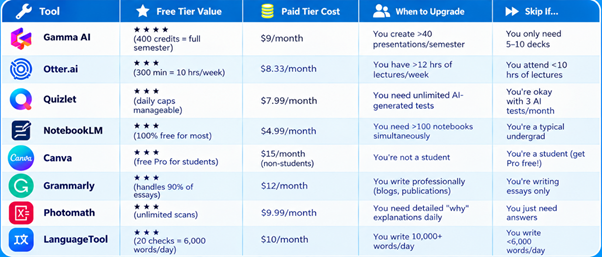
Verdict: For 95% of students, free tiers are enough for the entire mid-term. Upgrade only if you hit limits consistently for 2+ weeks.
How to Get Started (Step-by-Step)
In this section, we explore how to set up these tools according to your specific work requirements, which tools can be combined with them, and how to use them effectively to obtain the maximum benefit and complete tasks efficiently.
Step 1: Set Up Your Core Stack (15 minutes)
- NotebookLM: Sign in with a Google account → Create first notebook → Upload 3 PDFs/slides
- Gamma AI: Sign up → Use 400 free credits → Generate first presentation from a prompt
- Otter.ai: Install mobile app → Record a 30-min test lecture → Check transcription accuracy
Step 2: Add Specialised Tools (10 minutes)
- Quizlet: Create account → Import notes or search existing decks → Start Learn mode
- Grammarly: Install browser extension → Enable on Gmail/Google Docs → Write a test
- Canva: Verify the student status with.edu email → Unlock Pro features → Design a resume
Step 3: Optimise Your Workflow (Ongoing)
- Use NotebookLM for weekly reading summaries (100% free)
- Record all lectures with Otter.ai (stay under 300 min/month; split long lectures)
- Generate presentation drafts in Gamma AI before polishing in Canva (save credits)
- Review flashcards daily in Quizlet (free Learn mode capped—pace yourself)
- Run all essays through Grammarly before submission (unlimited free checks)
Pro tip: Track Gamma credits and Otter minutes in a simple spreadsheet to avoid mid-mid-term surprises.
Final Verdict
In this study, we explored ten different AI tools in detail to understand which tool is suitable for whom, how each tool can be used, and how combining these tools into an effective workflow can make our work easier and more efficient.
However, in reality, no AI tool is completely free to the extent that we may initially think it is. Each of these tools has certain limitations, and after reaching a specific usage limit, they may require payment to continue using their advanced features.
That is why we have tried to explain practical methods that can help you make the maximum possible use of these AI tools without spending money. By following the strategies discussed in this article, you can use these tools more effectively and obtain the most value from their free versions.
We hope this article helps you understand how to make the best use of AI tools and combine them intelligently to simplify your work while keeping costs to a minimum.
FAQs
In this section, we attempt to answer the possible questions that may arise regarding this study. If you have any additional questions or concerns related to this article, please contact us through our website and send us your query by email. We will make our best efforts to address your concerns and provide appropriate solutions.
Are these tools free, or do they require upgrades?
All 10 tools offer free plans that do not require payment to start. However, most have limits: Gamma provides 400 lifetime credits (enough for 30–40 presentations), Otter allows 300 minutes/month, and Quizlet caps daily advanced study modes. None hide paywalls mid-task—you’ll know the limits upfront. For most students, free tiers last the entire mid-term. Upgrade only if you need unlimited usage.
What if I run out of free credits or minutes?
Plan ahead: Use Gamma credits only for major presentations (not drafts). Long lectures were split into 30-min Otter recordings. For unlimited flashcards, pair Quizlet Free with Anki (100% free and open-source). If you hit limits, we have noted free alternatives in each tool section. Most students finish their midterms without paying.
Which tool is 100% free, with no limits?
NotebookLM (100 notebooks, 50 chats/day, unlimited with Google account), LanguageTool (20 checks/day, 10k characters each), and Photomath (unlimited photo scans) have the most generous free tiers. Khanmigo is free via Khan Academy for basic AI tutoring. These four tools have no credit systems or hard caps for typical student use.
Can I use multiple tools together without conflicts?
Absolutely. In fact, it is recommended to record lectures in Otter.ai → upload transcripts to NotebookLM for summaries → generate flashcards in Quizlet → create presentations in Gamma AI → polish essays in Grammarly. This workflow is free, efficient, and used by top students in 2026. No conflicts—each tool handles a different task.
Do these tools function offline?
Partially. Otter.ai and Quizlet mobile apps work offline for reviewing notes/cards, but transcription and AI features require an internet connection. NotebookLM and Gamma AI are web-first (need connection). Grammarly and LanguageTool browser extensions work offline for basic checks. For full offline access, pair these with Obsidian or OneNote.
Are there student discounts on paid plans?
Yes. Otter.ai offers 20% off Pro plans with.edu email. Canva provides free Pro access to verified students. Google offers free AI Pro (includes NotebookLM Pro) to university students in select countries through December 2026. Always check for .edu discounts before upgrading.
How do I know if the free plan is sufficient for my major?
Check our “Which Tool Is Better for Whom?” section (above). Type of student: Pre-medical sophomore Recorded lectures totalling 12 hours per week during midterm periods. Most free tiers cover 80–95% of tasks for your major. Upgrade only if you consistently hit limits for 2+ weeks.
Follow and Subscribe
Don’t miss our upcoming guides and technology updates.
Visit GrowwTechEducation, follow the website, and subscribe for future articles, AI tool guides, technology updates, and practical learning resources.
Keep learning. Keep exploring. Keep growing with technology.