Writing professional emails, preparing business reports, and organising meeting notes are important parts of everyday office work. However, these tasks can consume valuable time, especially for students, teachers, office employees, freelancers, and business professionals.
Today, ChatGPT can make these tasks easier by helping users organise information, improve grammar, create professional drafts, and communicate more effectively.
The best part is that you do not need advanced technical knowledge to use AI for writing. You only need clear instructions, also known as prompts.
In this article, we will explore 10 safe ChatGPT prompts for writing emails, reports, and meeting notes that can help improve productivity while maintaining professional communication and data privacy.
Why Use Safe ChatGPT Prompts for Professional Writing?
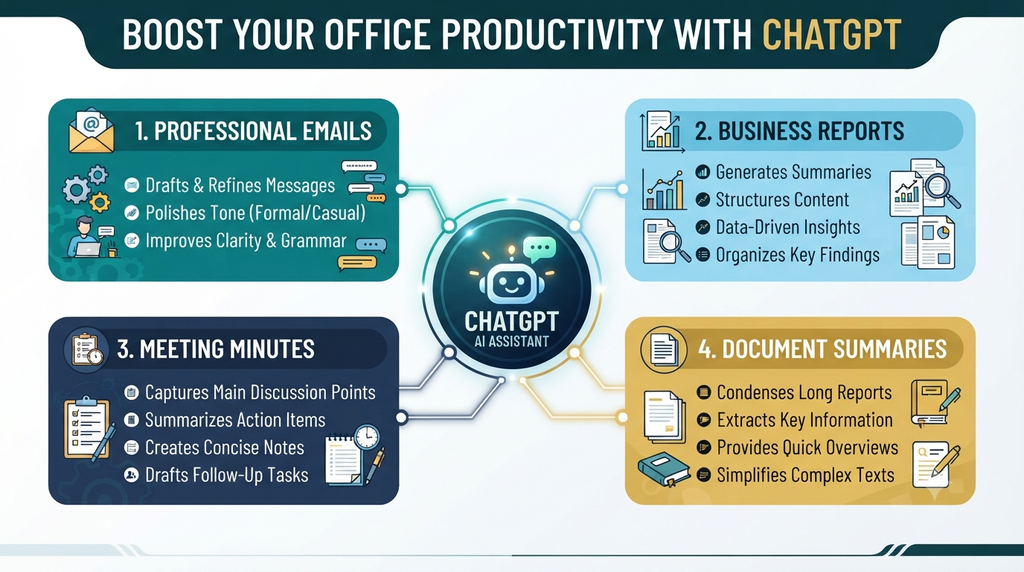
ChatGPT is a useful AI productivity tool for everyday writing tasks. It can help you:
- Write professional emails in less time.
- Prepare structured office reports.
- Convert rough notes into readable documents.
- Improve grammar and sentence clarity.
- Create meeting summaries and action points.
- Adjust writing tone according to the audience.
However, always review AI-generated content before sharing it. Never enter confidential company information, passwords, financial details, or sensitive personal data into AI prompts.
Safe ChatGPT Prompts
10 Safe ChatGPT Prompts for Everyday Office Work
1. Prompt for Writing Professional Emails
Writing a professional email requires clear language, a suitable subject line, and a polite tone.
Copy-and-use ChatGPT Prompt:
“Act as a professional communication assistant. Write a clear, polite, and professional email about [your topic]. Include an appropriate subject line, greeting, main message, and closing sentence. Keep the email concise and easy to understand.”
Best for: Office communication, business enquiries, professional requests, and follow-up emails.
2. Prompt for Writing Follow-Up Emails
Sometimes you need to remind someone about a pending response without sounding rude.
Prompt:
“Write a polite, professional follow-up email regarding [topic]. Mention that I am following up on my previous communication. Keep the tone respectful, friendly, and professional. Avoid sounding demanding.”
Best for: Job applications, client communication, pending approvals, and business discussions.
3. Prompt for Writing Leave Application Emails
Employees and students frequently need to write leave requests.
Prompt:
“Create a professional leave application email for [number of days] due to [general reason]. Include the leave dates, a polite request for approval, and a professional closing. Use simple English.”
Best for: Employees, teachers, students, and office staff.
4. Prompt for Preparing Professional Reports
Reports should be organised, informative, and easy to understand.
Prompt:
“Act as a professional report-writing assistant. Prepare a structured report on [topic] using the information I provide. Include an introduction, key findings, important points, recommendations, and a conclusion. Do not invent facts or statistics. Highlight information that needs verification.
Best for: Office reports, project reports, academic reports, and business summaries.
5. Prompt for Creating Meeting Notes
Long meetings can produce a lot of information. ChatGPT can convert rough notes into an organised format.
Prompt:
“Convert the following meeting notes into a professional meeting summary. Organise the information under meeting objectives, key discussion points, decisions made, action items, and next steps. Use only the information provided and mark unclear details for confirmation.”
Best for: Office meetings, team discussions, and project planning.
6. Prompt for Writing Meeting Minutes
Meeting minutes provide an official record of important discussions and decisions.
Prompt:
“Prepare professional meeting minutes using the following non-confidential meeting information. Include meeting date, agenda, participants (if provided), key decisions, assigned responsibilities, and deadlines. Use a formal and easy-to-read format. Do not assume missing information.”
Best for: Managers, team leaders, teachers, and administrative professionals.
7. Prompt for Improving Grammar and English
Poor grammar can affect the quality of professional communication.
Prompt:
“Review the following text and correct grammar, spelling, punctuation, and sentence structure. Maintain the original meaning and make the language professional, natural, and easy to understand. Do not add unnecessary information.”
Best for: Emails, reports, applications, and official documents.
8. Prompt for Creating a Weekly Work Report
Weekly reports help professionals track completed tasks and upcoming responsibilities.
Prompt:
“Create a professional weekly work report using the information provided below. Divide it into completed tasks, ongoing activities, challenges, achievements, and next week’s priorities. Use bullet points and clear headings. Do not create unsupported achievements.”
Best for: Employees, freelancers, managers, and project teams.
9. Prompt for Writing Professional Business Proposals
A well-organised proposal can help communicate ideas clearly.
Prompt:
“Create a professional business proposal for [project or service]. Include an executive summary, objectives, proposed solution, implementation steps, expected benefits, estimated requirements, and conclusion. Use a persuasive but honest professional tone. Clearly identify assumptions.”
Best for: Freelancers, small businesses, consultants, and entrepreneurs.
10. Prompt for Summarising Long Documents
Reading lengthy documents can take considerable time. AI can help prepare short summaries.
Prompt:
“Summarise the following document into simple and clear language. Highlight the main ideas, important facts, key conclusions, and action points. Use bullet points and avoid changing the original meaning. Mention any unclear information.”
Best for: Students, teachers, researchers, and office professionals.
Safe ChatGPT Prompts
Important Safety Tips When Using ChatGPT
Although AI writing tools are helpful, responsible usage is essential.
Follow these simple safety practices:
- Protect personal information: Avoid sharing passwords, bank details, confidential records, or private employee information.
- Verify important facts: Always check dates, figures, names, and references.
- Review before sending: Never send AI-generated emails without reading and editing them.
- Maintain originality: Use ChatGPT to organise your ideas rather than blindly copying its output.
- Follow workplace policies: Check whether your organisation permits AI tools for professional documents.
These practices help make AI-assisted writing more reliable and responsible. Safe ChatGPT Prompts
Final Thoughts
ChatGPT is becoming a valuable productivity tool for students, employees, teachers, freelancers, and business owners. With the right instructions, you can prepare professional emails, organise meeting notes, create reports, and improve everyday communication.
These 10 safe ChatGPT prompts provide a practical starting point for using AI in daily work. You can customise each prompt according to your requirements and save your favourite prompts for future use.
Remember, AI should support your knowledge and creativity, not replace your judgement. Always review the final output before using or publishing it.
Start using these prompts today and make your everyday writing tasks simpler, faster, and more organised!
Frequently Asked Questions (FAQs)
1. Can ChatGPT write professional emails?
2. Is ChatGPT useful for writing office reports?
3. Can ChatGPT prepare meeting minutes?
4. Is it safe to use ChatGPT for office work?
5. Are ChatGPT writing prompts free to use?
Like, share, and subscribe to GrowwTech Education for more beginner-friendly blogging and SEO guides!